
Dynamic Multistore - Different assets for the different stores

Hello everyone,
we are currently using the dynamic multistore in one of our projects and we have the requirement to apply a slightly different styling to each store.
For simplicity let's say we only want to adjust some scss variables that are currently in the default Theme in the ShopUi folder.
We thought about using code buckets for this, but couldn't find a working solution on how to configure the building of the assets.
So first question: Are code buckets also considered to be used for scss adjustments or is there any other/better way to do this? A theme per store would also work I guess.
And second question, is there any documentation or example to figure out how this need to be configured for the dynamic multistore?
Thanks,
Lukas
Answers
-
Hi Lukas!
Code buckets and themes have to be prepared before hand. It means if you create a new store in the backoffice with DMS and that codebucket folder doesn't exist, it won't work.
The asset building has to be done beforehand.
You declare your themes bound to each store in
config/Yves/frontend-build-config.json{ "codeBucket": "", "namespace": "", "themes": ['green','purple','blue'], "defaultTheme": "default"}then you add your new themes in ShopUi and run the Yves frontend scripts to generate the new themes.
npm run yves from the container cliThen for every code bucket you'd like to have , you have to create a Twig's config override that returns the theme for that code bucket> for DE codebucket
src/Pyz/Shared/TwigDE/TwigConfig.php
and override the getYvesTheme and return the them name to override 'default'.Last thing is to override the CodeBucket config to read your store and not the regions in
src/SprykerConfig/CodeBucketConfig.php
and ovverrides the codebucket array and getDefaultCodeBucket to get the codebucket, the store code, from the url.
0 -
Thanks a lot @Hidran Arias
I'll try it out and get back to you if something is unclear0 -
@Hidran Arias
have you had any issues with the container memory limit with multiple themes?
Do you know if that could be configured?
We are running into memory issues with the container when we want to build the themes (12 themes in our case):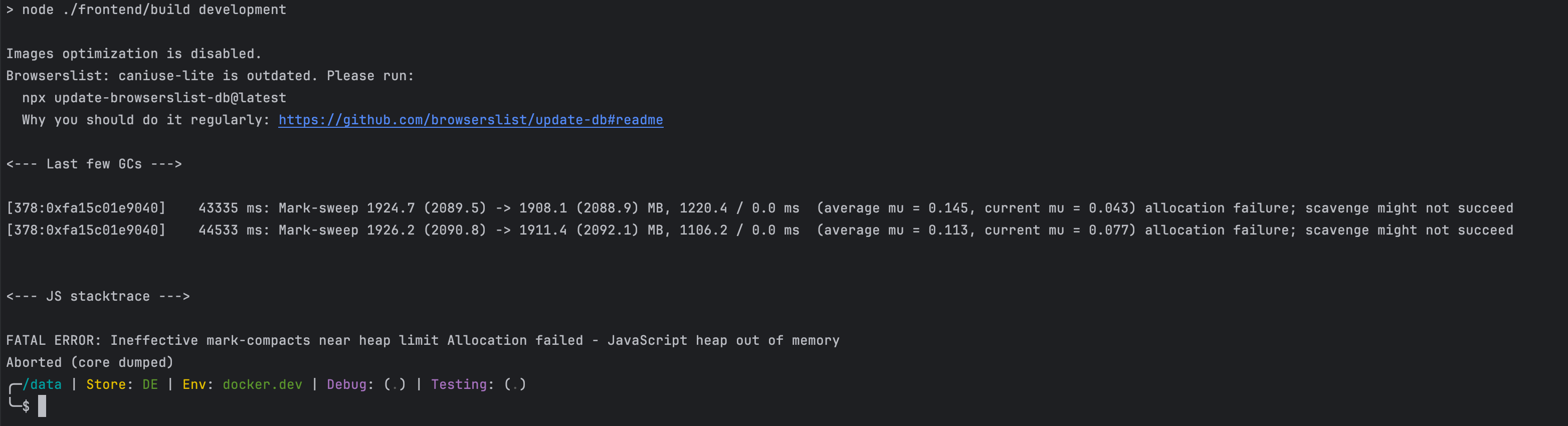 0
0 -
I just ran it on b2b marketplace and no issues. Everything green.
It could be node memory isn´t enough for the resources you´re adding to the themes such as huge images size?
Afterwards, I executed:export NODE_OPTIONS="--max-old-space-size=4096"
/usr/bin/time -v node ./frontend/build development in the cli and Got around 6GB of memory usage
Maximum resident set size (kbytes): 60994400 -
Thanks a lot for the quick answer!
I'll try it out0


Categories
- All Categories
- 42 Getting Started & Guidelines
- 7 Getting Started in the Community
- 8 Additional Resources
- 7 Community Ideas and Feedback
- 92 Spryker News
- 1K Developer Corner
- 855 Spryker Development
- 93 Spryker Dev Environment
- 362 Spryker Releases
- 3 Oryx frontend framework
- 36 Propel ORM
- 68 Community Projects
- 3 Community Ideation Board
- 30 Hackathon
- 3 PHP Bridge
- 6 Gacela Project
- 35 Job Opportunities
- 3.2K 📜 Slack Archives
- 116 Academy
- 5 Business Users
- 370 Docker
- 551 Slack General
- 2K Help
- 75 Knowledge Sharing
- 6 Random Stuff
- 4 Code Testing
- 34 Product & Business Questions
- 70 Spryker Safari Questions
- 51 Random